
You are using an out of date browser. It may not display this or other websites correctly.
You should upgrade or use an alternative browser.
You should upgrade or use an alternative browser.
Performance editor
- Thread starter BeechIT
- Start date

BeechIT
New member
Hi, apologies, to clarify, I use the modx-m more for multi timbral performances, for different songs, song mode if you like. I use live sets to manage the performance per song but want to go a level deeper remotely.. Does the software replicate and control all part settings on the fly eg, change of midi channel, particularly select, mute, turn arps and fx's on/off, volume etc. Rather than me have to manage all this on the Modx-m's small screen. So a view similar to 'mixing mide' on the XF.
Korg and others have similar remote tools to replicate performance mode on a larger tablet or touch screen laptop.
Hope that's clearer
Korg and others have similar remote tools to replicate performance mode on a larger tablet or touch screen laptop.
Hope that's clearer
BeechIT
New member
Yeah it would be a god send for songwriters using the modx-m for songwriting and mainly studio, rather than sound architecture and live
The OS setup of the modx-m is focused on live and sound design, they've missed a big chunk out for composing. I need a larger mixing view with all 16 channels and all options quickly accessible with associated sub settings on clicking. The lack of the external touch screen option on the modx-m is making my life difficult, and causing me back pain from hunching over, so this would be a fantastic workaround.
Please keep me posted as I know a number of users desperately needing a remote option. Yamaha really behind the times with this
The OS setup of the modx-m is focused on live and sound design, they've missed a big chunk out for composing. I need a larger mixing view with all 16 channels and all options quickly accessible with associated sub settings on clicking. The lack of the external touch screen option on the modx-m is making my life difficult, and causing me back pain from hunching over, so this would be a fantastic workaround.
Please keep me posted as I know a number of users desperately needing a remote option. Yamaha really behind the times with this

I like the idea and I have something cooking... watch this space!Yeah it would be a god send for songwriters using the modx-m for songwriting and mainly studio, rather than sound architecture and live
The OS setup of the modx-m is focused on live and sound design, they've missed a big chunk out for composing. I need a larger mixing view with all 16 channels and all options quickly accessible with associated sub settings on clicking. The lack of the external touch screen option on the modx-m is making my life difficult, and causing me back pain from hunching over, so this would be a fantastic workaround.
Please keep me posted as I know a number of users desperately needing a remote option. Yamaha really behind the times with this
That was a bit cryptic wasn't it..?
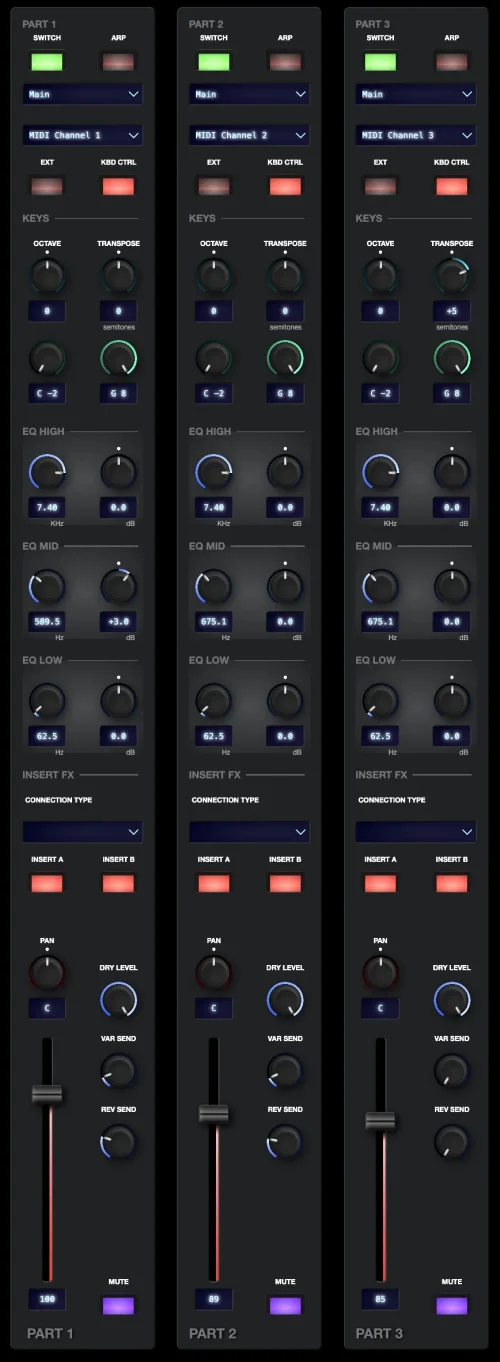
I'm working on a new 'mixing' editor, separate from the main sound design interface. I'll be built around the concept of channel strips.
At present, I'm planning to expose the following controls for each part:
I'm working on a new 'mixing' editor, separate from the main sound design interface. I'll be built around the concept of channel strips.
At present, I'm planning to expose the following controls for each part:
- Part switch
- Part arp switch
- MIDI channel
- Internal/external switch
- Keyboard control switch
- Note range low/high
- 3-band EQ L/M/H frequency and gain
- Insertion connection type
- Ins A / Ins B switches
- Dry level
- Var send
- Rev send
- Pan
- Level
- Mute
- Output destination
BeechIT
New member
Fantastic, that is amazing. Yeah I suspected it might do....Maybe implement a 2 page option / switch view option like the XF to declutter?That was a bit cryptic wasn't it..?
I'm working on a new 'mixing' editor, separate from the main sound design interface. I'll be built around the concept of channel strips.
At present, I'm planning to expose the following controls for each part:
The channel strips are already looking fairly hefty with those controls. I'd love to add Solo, but MONTAGE doesn't expose the ability through MIDI so I can't do that. Are there any other vital controls I've missed here?
- Part switch
- Part arp switch
- MIDI channel
- Internal/external switch
- Keyboard control switch
- Note range low/high
- 3-band EQ L/M/H frequency and gain
- Insertion connection type
- Ins A / Ins B switches
- Dry level
- Var send
- Rev send
- Pan
- Level
- Mute
- Output destination
Re. Missed functions, Other than part select / voice search on select, or is that 'Part switch' ?
Shame about the solo but certainly not a deal breaker. I'm trying to think now what was available on the XF, 'Parameter or Arp with Voice' was one of the soft buttons in mixing mode, I'm sure there's something similar on the montage but not in mixing view.
Unfortunately I don't have access to my modx-m8 ATM. Let me go back to my work flow screenshots and if there's anything glaringly obvious will contact you. Thank you again, this will be a game changer.
BeechIT
New member
Oh almost forgot, and if possible, a save or sync edited performance.Fantastic, that is amazing. Yeah I suspected it might do....Maybe implement a 2 page option / switch view option like the XF to declutter?
Re. Missed functions, Other than part select / voice search on select, or is that 'Part switch' ?
Shame about the solo but certainly not a deal breaker. I'm trying to think now what was available on the XF, 'Parameter or Arp with Voice' was one of the soft buttons in mixing mode, I'm sure there's something similar on the montage but not in mixing view.
Unfortunately I don't have access to my modx-m8 ATM. Let me go back to my work flow screenshots and if there's anything glaringly obvious will contact you. Thank you again, this will be a game changer.
BeechIT
New member
Probably pushing it a bit now, but would be great to visually see the note polythony count per channel/part/total utilised, ie. Multi part voice, holding 1 key uses eg. 4 notes, does that make sense? I've come across it a few times where notes are cutting off especially with anx parts in tracks, thing is, it's not immediately obvious which part is causing the clipping / exceeding polythony. Is that even possible?Oh almost forgot, and if possible, a save or sync edited performance.
BeechIT
New member
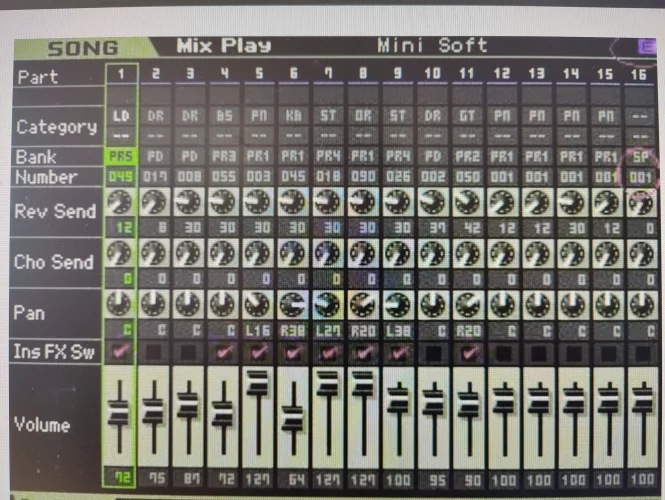
Just had a look at the XF mix play screen, it shows the bank/voice number per chanel with a top border detailing the full voice name appearing on each selected track, not just the category name as it is now on the modx-m.I'm afraid that controls to store a performance to memory, and any sort of polyphony monitor are not exposed by the MONTAGE MIDI implementation, so I won't be able to implement either of those features.
Making it much easier to see full voice name and location. Aware of not over doing it on the details but it is a useful addition, especially when your selecting different voices/parts whilst the tracks is running to find a eg. A bass sound that works, your can make a note of the original part location and use category search to go back to it, as the data wheel doesn't select in sequence which can be frustrating.
Attachments
Similar threads
- Replies
- 1
- Views
- 193

- Replies
- 5
- Views
- 263
- Replies
- 3
- Views
- 79